Tested workflow guide
How to Automate Inbound Lead Follow-Up with Make and HubSpot for Free
A practical workflow for small service businesses, documented with evidence from a controlled Make, HubSpot, and Gmail end-to-end test.
Small service businesses often receive leads while the owner is on a job, speaking with a customer, or away from a computer. A delayed response can leave a serious prospect waiting. Copying form submissions between email and a CRM also makes it easier to miss the next action.
This guide documents a minimal workflow that we actually tested:
Website or test form
  → Make custom webhook
  → HubSpot create or update contact
  → Router
      → consent=true: Gmail confirmation
      → consent=true AND lead_score≥40: HubSpot task due in 24 hours
The workflow uses transparent rules rather than a runtime AI model. That keeps the first version understandable, avoids extra API cost, and makes the consent and qualification gates easy to inspect.
How evidence is labeled
Tested Completed in a controlled Human E2E Validation using real Make, HubSpot, and Gmail accounts with synthetic data.
Official Confirmed in current product documentation, but not necessarily exercised in every possible configuration.
Not yet verified A production condition, result, or limit this experiment has not proved.
What the end-to-end test proved
| Check | Evidence | Result |
|---|---|---|
| Webhook created or updated a HubSpot contact | Tested | Passed |
| Incoming values mapped into HubSpot fields | Tested | Passed |
| Gmail delivered the confirmation message | Tested | Passed |
consent=false prevented the email route | Tested | Passed |
| HubSpot received a follow-up task due in 24 hours | Tested | Passed |
Qualified route required consent=true AND lead_score>=40 | Tested | Passed |
WARM test: consent=true, lead_score=55 | Tested | Follow-up route ran as expected |
BLOCKED test: consent=false, lead_score=20 | Tested | Email was blocked as expected |
This proves that the minimum technical path worked in the controlled test. It does not prove production reliability, customer outcomes, or commercial performance.
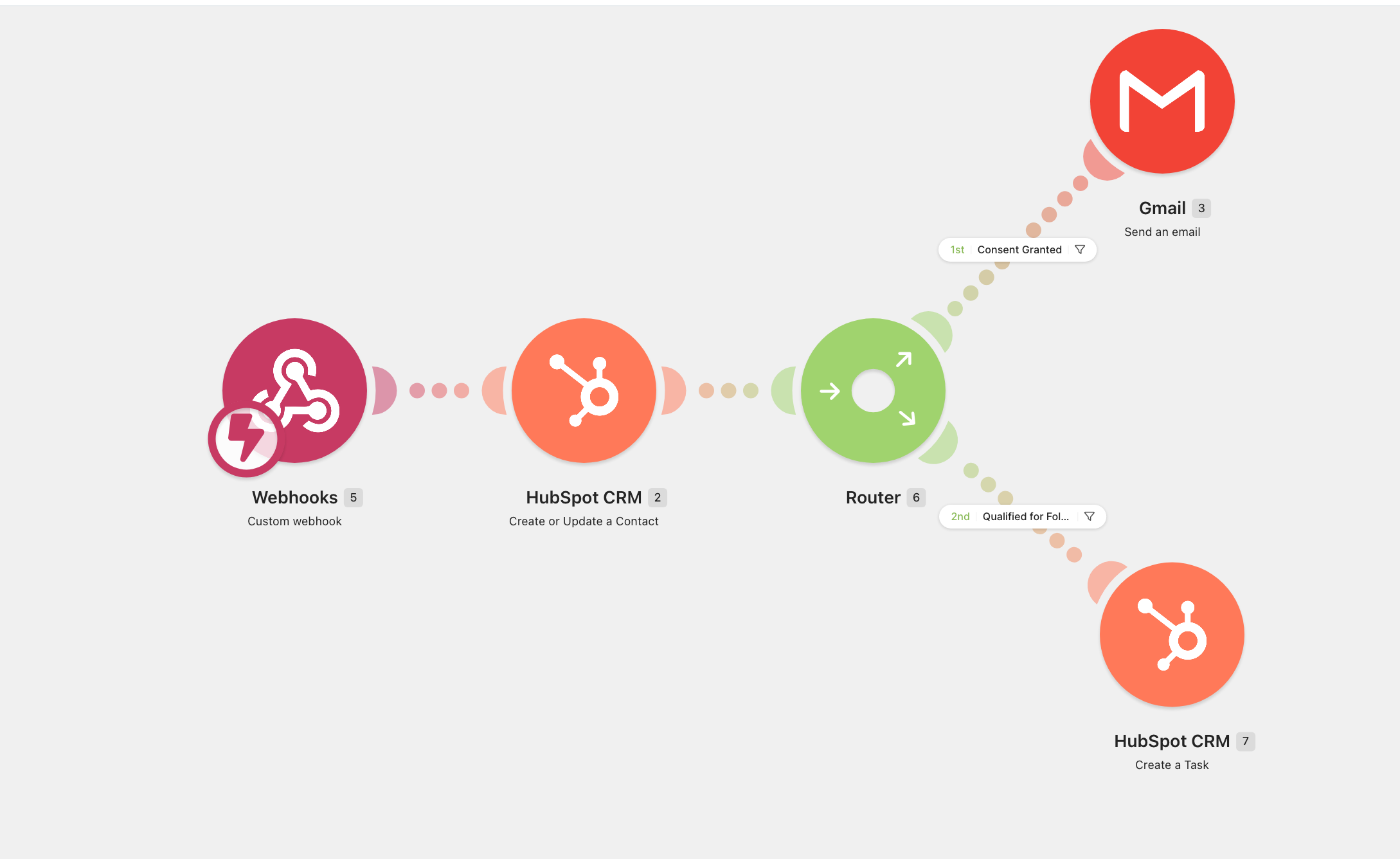
Why this MVP can start at $0
Official Make currently lists a Free plan with no time limit, up to 1,000 credits per month, routers and filters, and up to two active scenarios. Make also explains that module actions generally consume credits. Always check the current Make pricing page because limits can change.
Official HubSpot currently describes its free CRM as having no expiration date, with up to two users and 1,000 contacts. Check the current HubSpot free CRM page for current limits.
Tested Our controlled MVP used free accounts and an existing Gmail account. The workflow test produced $0 in new cash cost and $0 in additional API cost.
Not yet verified We have not measured monthly Make credit consumption under real lead volume. “Free” here means this tested MVP fit within the current free tiers and existing resources—not that every business or future version will always cost nothing.
Step 1: define the minimum lead data
Start with only the information required to acknowledge and route a request:
- first name
- requested service
- message
- consent flag
- lead score
- source
Avoid sending unnecessary personal or sensitive data into the workflow. Decide what the consent flag means for your business and jurisdiction before processing real prospects. This guide describes an operational control, not legal advice.
Step 2: receive the form submission in Make
Create a scenario with a Make custom webhook and send one synthetic submission to establish the incoming data structure.
Official Make says custom webhooks provide a URL that an external service can call, and webhook scenarios usually execute immediately after a request arrives. See Make’s webhook documentation.
Tested The E2E submission passed through the custom webhook, and Make mapped the incoming fields into the next modules.
Step 3: create or update the HubSpot contact
Connect HubSpot through OAuth, then map the incoming fields into the contact module. Inspect the first execution carefully before activating the scenario.
Official Make’s HubSpot integration lists actions to create a contact, create or update a contact, create a note, and create a task. Its “Create or Update a Contact” action uses the specified email to decide whether to create or update. See the Make and HubSpot integration reference.
Tested Contact creation/update and dynamic field mapping passed during the controlled test.
Important design detail: in this tested scenario, the HubSpot contact module runs before the router. The consent filters protect the Gmail and qualified-task branches; they do not prove that consent=false prevents CRM storage. If your policy requires consent before storing any record, move the relevant consent gate before HubSpot and test that design separately.
Step 4: gate the confirmation email on consent
Add a router after the HubSpot module. The Gmail branch uses this condition:
consent = true
Official Make documents routers as a way to branch a scenario and filters as gatekeepers that only pass data when defined conditions are met. See the official router and filter documentation.
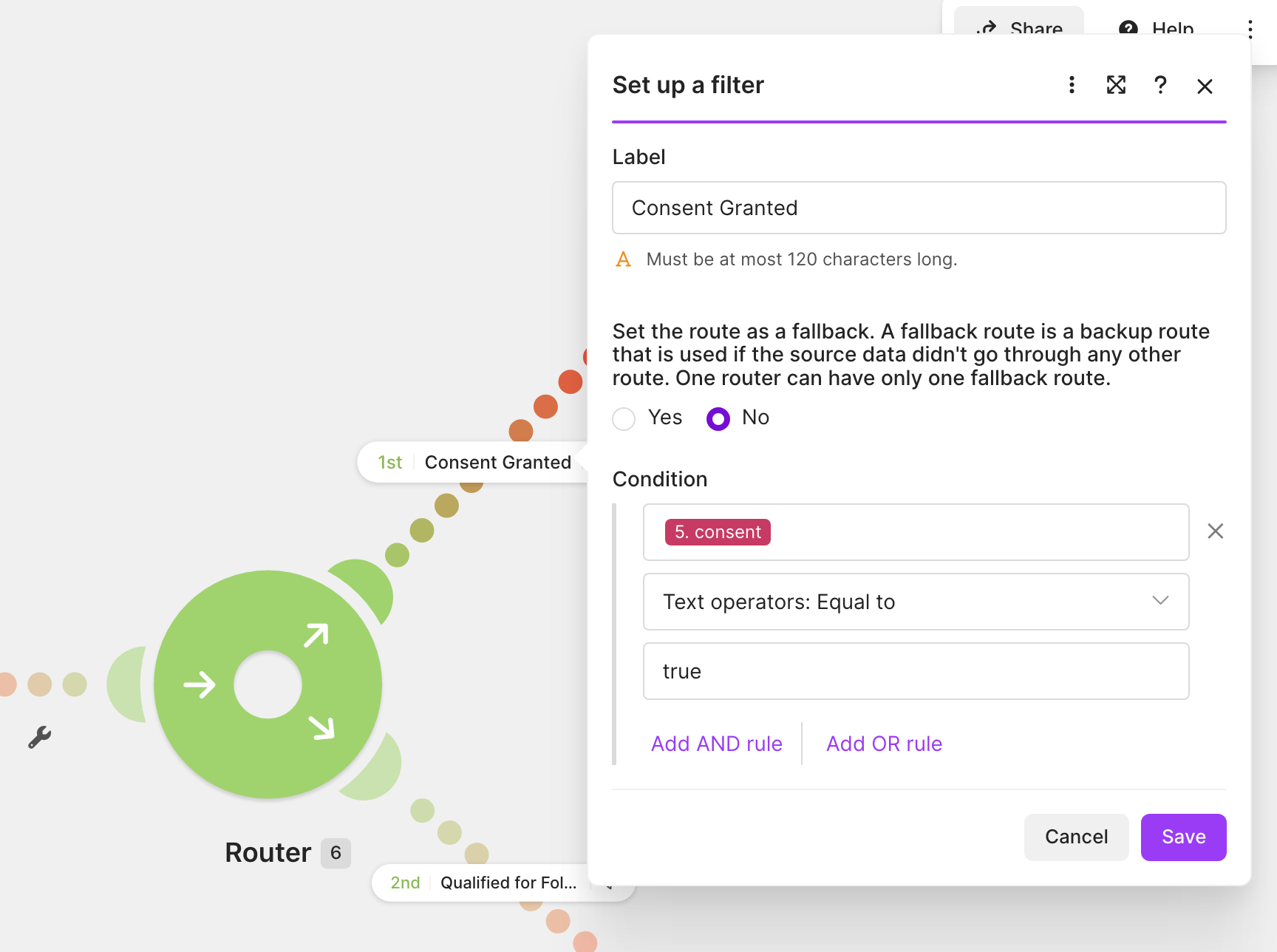
consent=true. No account identifiers are shown.Tested The allowed test delivered a Gmail confirmation. The consent=false test did not send an email.
Step 5: create a task only for qualified leads
The second route creates an internal follow-up task only when both conditions are true:
consent = true
AND
lead_score >= 40
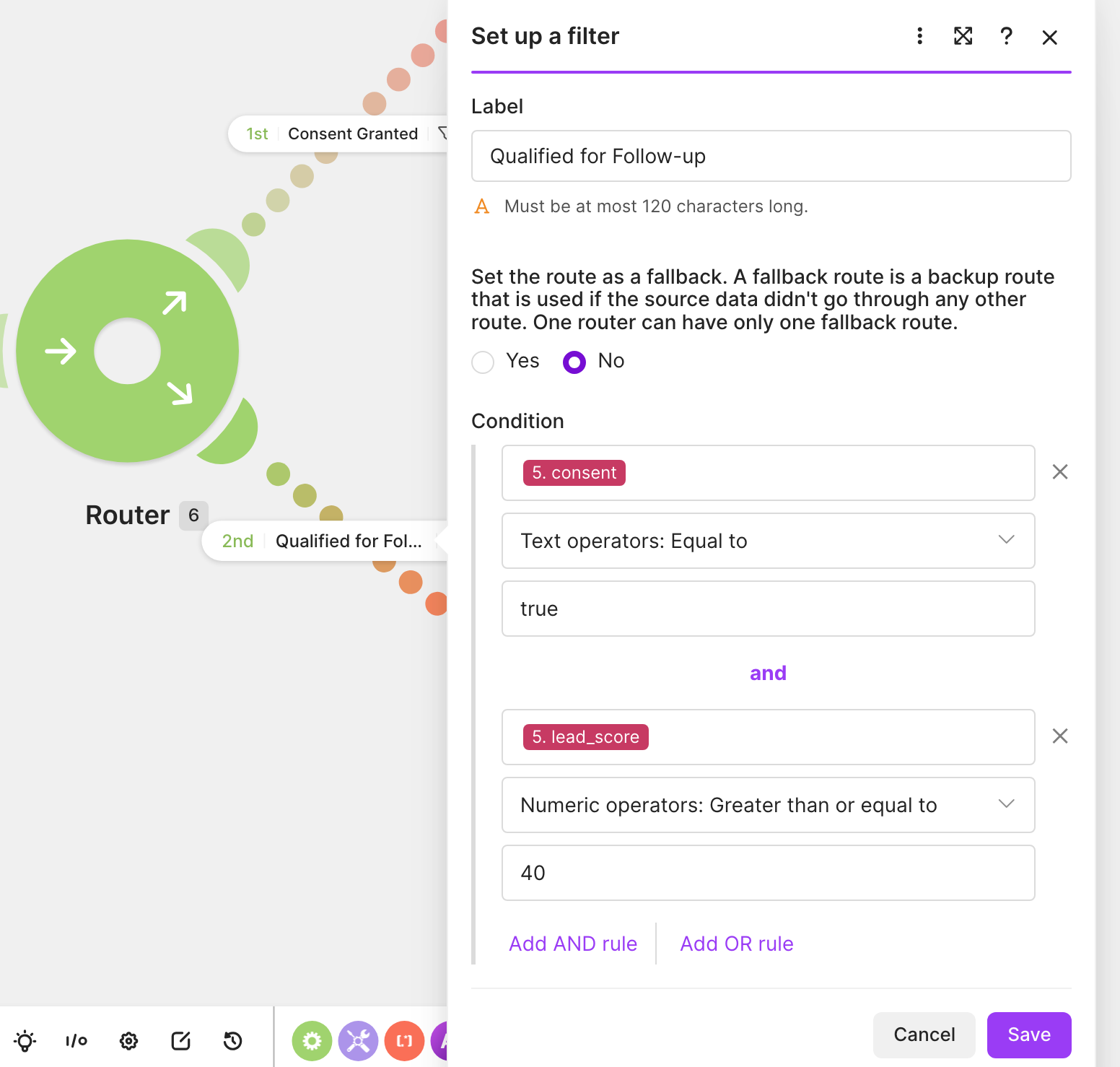
consent=true AND lead_score>=40.Tested A WARM input with consent=true and lead_score=55 passed this route. The HubSpot task was created with a due date 24 hours after the test submission.
For the focused task-module setup and verification sequence, see How to Automatically Create a HubSpot Follow-Up Task from a Website Form with Make.
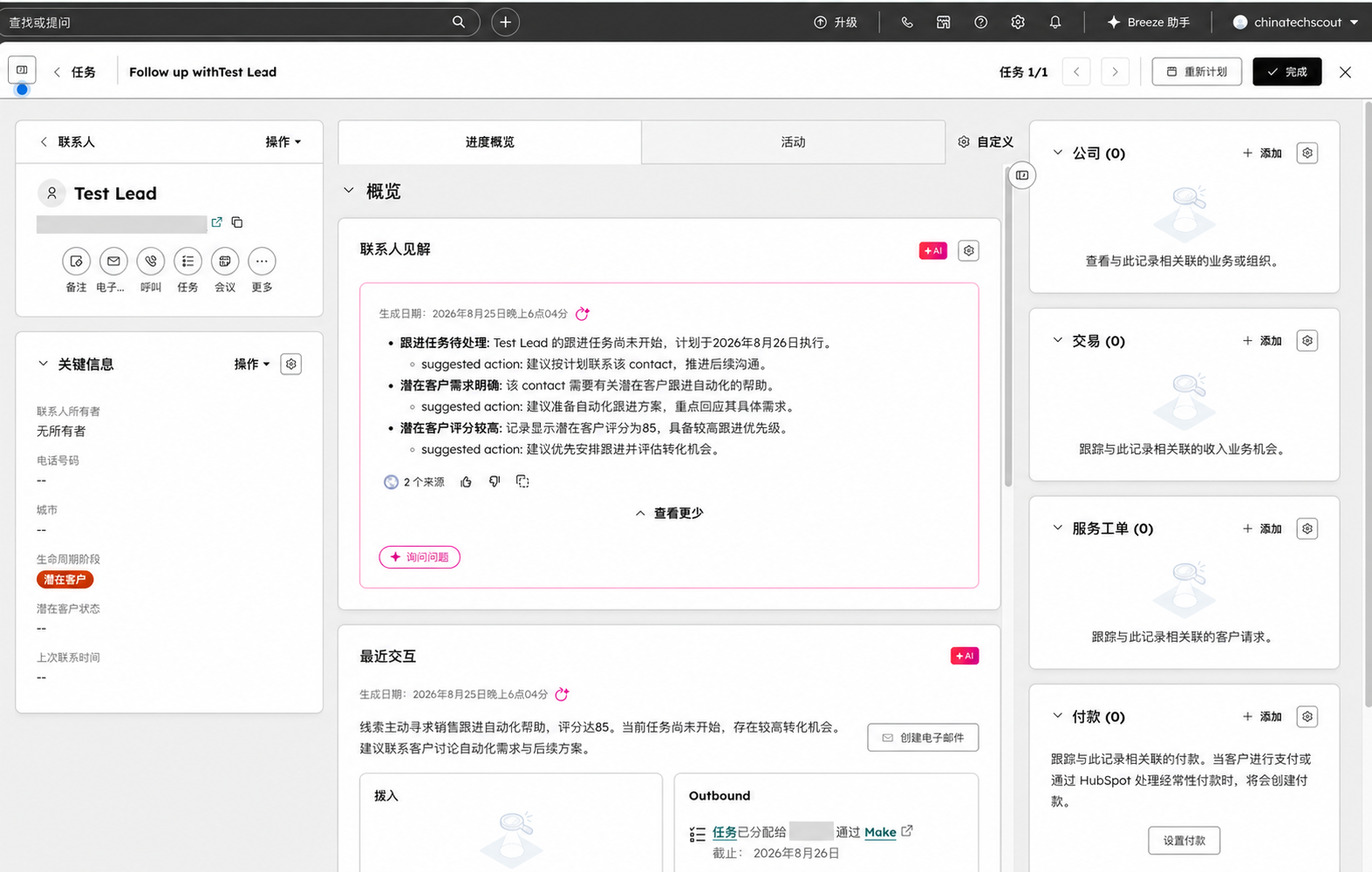
Not yet verified The experiment did not test task ownership across a multi-user team, escalation when a task becomes overdue, or suppression after a lead replies.
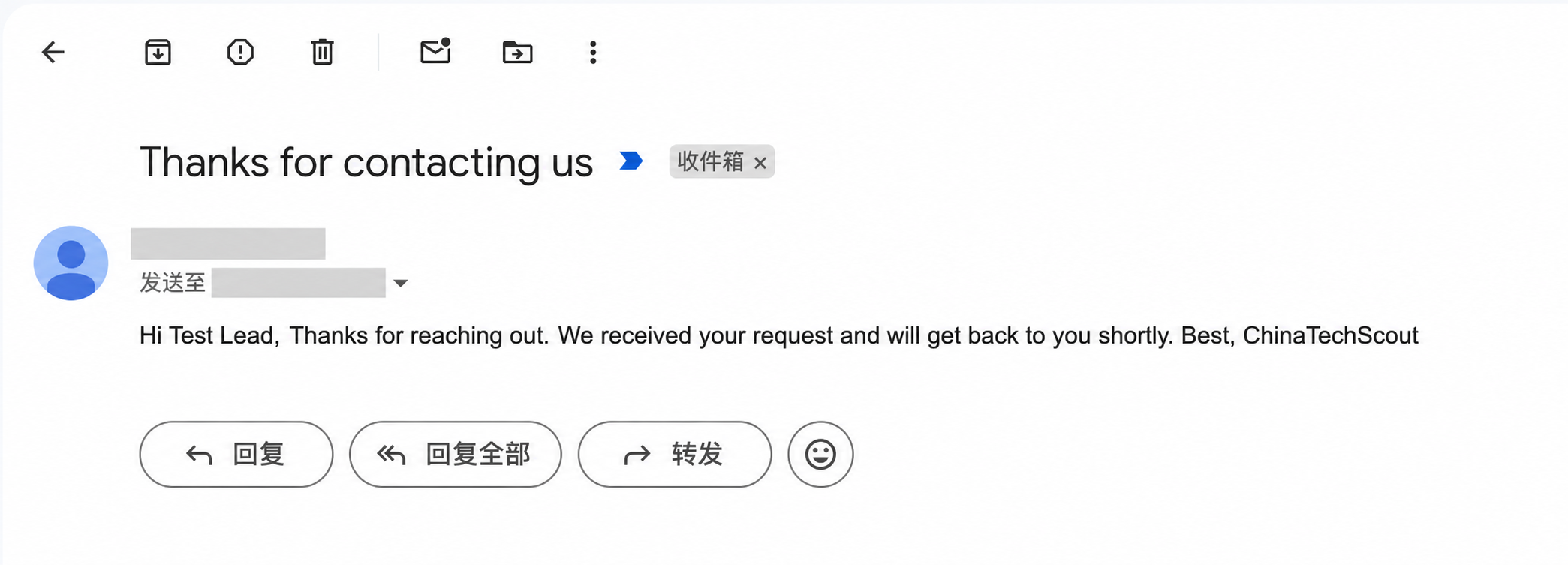
Step 6: send a short Gmail confirmation
Keep the first message transactional and specific. Confirm receipt, repeat the next step, and set an honest expectation for a human response. Do not promise a response time your business cannot meet.
Official Make’s Gmail integration includes a “Send an Email” action. See the Make and Gmail integration reference.
Tested The personalized confirmation was delivered to the approved test inbox.
Test both the allowed and blocked paths
Before using real inbound leads, submit at least two synthetic cases:
- An allowed case above the qualification threshold with consent set to true.
- A blocked case below the threshold with consent set to false.
Confirm the outcome in all three systems: Make execution history, the HubSpot contact/task, and the test inbox. Do not rely only on a green scenario status.
What this test does not prove
- Not yet verified Deliverability to real prospects or performance across different email providers.
- Not yet verified Reliability under sustained or concurrent lead volume.
- Not yet verified Real monthly Make credit consumption for this workflow.
- Not yet verified Reply detection, automatic suppression, retries, or escalation paths.
- Not yet verified Affiliate clicks, signups, conversions, payouts, or revenue.
- Not yet verified Compliance for every country, state, industry, or message type.
Tool links
Make is the primary workflow offer and HubSpot is the secondary CRM offer for this experiment.
- Create a Make account (affiliate link)
- Explore HubSpot’s free CRM
If affiliate links are added later, ChinaTechScout will update the nearby disclosure before replacing any direct product link.
Questions or corrections? Email [email protected].